Meet PlayBuddy and PlayType: The Kids Who Teach Typing on TypePlay
Who PlayBuddy and PlayType are, where they appear on TypePlay, how they help children learn to type, and how the two characters were made.
By Raushan, founder of TypePlay · · 3 min read
Every part of TypePlay has a guide. On the first visit, two kids say hello from the home page: PlayBuddy and PlayType. They are the faces and voices of TypePlay, and they are there for one reason: to make ten minutes of typing practice feel like playing with a friend.
Two friends, two jobs
- PlayBuddy, the typing coach: a boy of about eight with wavy brown hair, a blue hoodie with the white play triangle, jeans and blue-and-white sneakers. He looks after practice and tests.
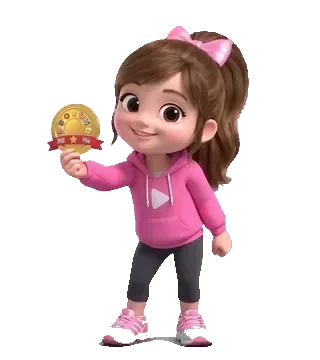
- PlayType, the learning friend: a girl of about seven with a high ponytail and a big pink bow, a pink hoodie with the same play triangle and pink sneakers. She looks after the lessons, games and progress.
Where you meet them
- Home: the two of them welcome a new visitor in a short greeting video (it plays with sound only after a tap, never by surprise).
- Learn: PlayType introduces the course map, and both characters appear on the picture cards of the first lessons.
- Practice and the typing tests: PlayBuddy explains what each mode is for, then sits at his desk while you type and comes back after a quiet while.
- Games: the characters star in the games, in costume. PlayType is the ninja in the ninja typing game, the pilot in the airplane typing game and the mango hunter in the monkey typing game; PlayBuddy is the magician in Memory Typing and the hero of Wildwood Duel.
- Stats and badges: PlayType explains the progress pages and holds up a medal when a new badge is earned; the two take turns presenting the weekly report for parents.
Why a typing site has characters
Young children often cannot read instructions yet, and a blank keyboard is not much fun. A friendly character who says "Put your pointer fingers on F and J" out loud solves both problems: the child hears what to do and sees someone their own age doing it. The characters also keep praise where it belongs: they cheer careful, accurate typing and finished lessons, not raw speed, because accuracy is what turns into speed later (see what a good typing speed is).
For older students and adults, the characters stay in the background. They speak only short lines, a tap on the header speaker silences them, and the job and certificate tests stay quiet.
The guide hands
The third helper on every keyboard is a pair of line-art hands. They rest on the home row, and the finger that should press the next key turns blue and reaches for it while the other fingers stay home. PlayType explains the posture they show in why your fingers should curve like a "C".
How PlayBuddy and PlayType were made
PlayBuddy and PlayType were inspired by the founder’s daughters, Aadhya and Kabya. The two girls helped create and choose the characters and the guide hands, and shaped the look and feel of TypePlay: they tried the versions and said which ones felt friendly and fun. The characters themselves are cartoons, not pictures of real children.
The characters were designed by TypePlay’s founder over many rounds with AI image and video tools, and refined by hand-picked changes: the boy was chosen over an owl and a talking keycap, a girl was added to keep him company, her first name (PlaySister) became PlayType, and their headphones came off. Their voices were designed for TypePlay rather than copied from any real child. The guide hands were drawn in code, line by line, for TypePlay’s own keyboards.
Say hello
The quickest way to meet them is Lesson 1. It takes about five minutes, and by the end your child will know where the fingers rest and which hand types which key. For a gentle first week, follow PlayBuddy’s 5-day home-row plan.
Try it on TypePlay
- Lesson 1 with PlayBuddy and PlayType →The first lesson: where the fingers rest, with both characters.
- Typing games →Four ad-free games for young beginners, and arcade games starring the two characters.
- Parent progress report →A weekly summary of what your child practised.
Free, in your browser, no account needed.
Questions and answers
Who are PlayBuddy and PlayType?
They are TypePlay’s two cartoon characters. PlayBuddy is a boy of about eight in a blue hoodie, the typing coach. PlayType is a girl of about seven in a pink hoodie with a pink bow, the learning friend. Both wear the white play triangle of the TypePlay logo.
Can I turn the characters’ voices off?
Yes. The round speaker button in the header switches their voices on or off, and the choice is remembered on that device. Settings › Voice has its own volume slider, separate from the key sounds.
Who inspired PlayBuddy and PlayType?
The founder’s daughters, Aadhya and Kabya. They helped create and choose the two characters and the guide hands, and the look and feel of the site. PlayBuddy and PlayType are cartoon characters, not pictures of real children.
Are their voices real children’s voices?
No. Their voices were designed for TypePlay. No real child’s voice was recorded or copied to make them.
Do the characters chat with my child?
No. They speak short, pre-written lines: a welcome, a tip, a cheer. TypePlay has no chat, no messaging and no accounts, and it collects nothing personal.